
Automatic Routing Number Validation for Zoho CRM
Immediately detect invalid ABA Routing Numbers via checksum validation
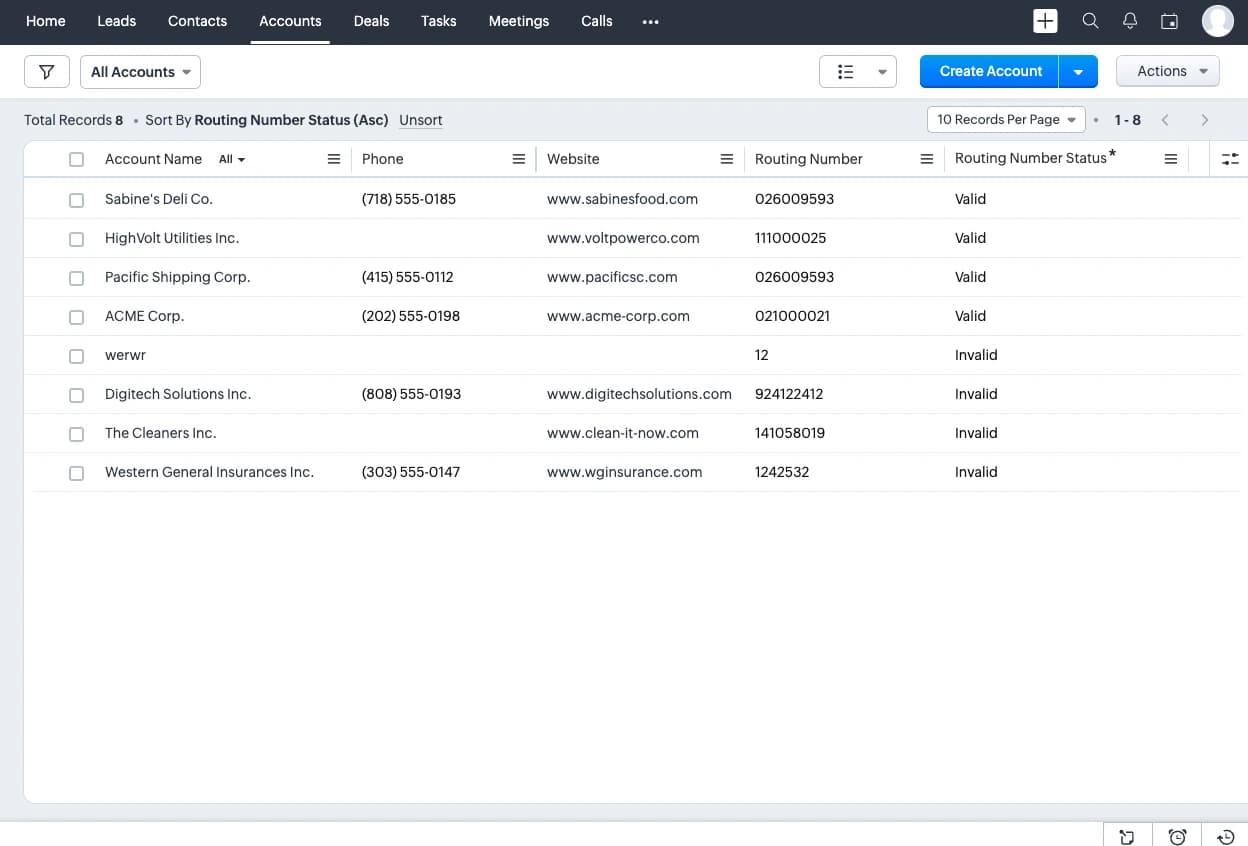
- Available in four CRM modules: Leads, Accounts, Contacts, and Vendors. Also available for custom modules (requires extra configuration).
- Fast. Checksum test is performed immediately every time a routing number is created or modified and the result is displayed within seconds.
- Secure. The extension performs all operations within your CRM instance. No data is sent to us or to any third-party service.
- Unlimited validations. Validate routing numbers at scale without any additional cost.
Why validate routing numbers?
Routing numbers (also known as ABA numbers) are essential for identifying financial institutions within the United States. They are widely used for transactions such as ACH transfers, wire transfers, and direct deposits. Verifying routing numbers helps prevent errors, ensuring that payments are processed smoothly and directed to the correct bank.
Businesses often store routing numbers in their CRMs as part of customer billing details or vendor payment information. These numbers can also be used for processing employee payroll. Ensuring that routing numbers are valid and correctly formatted is crucial for avoiding transaction failures and delays in day-to-day financial operations.
This extension automatically validates the checksum of routing numbers entered into Zoho CRM, and notifies you if a routing number is invalid, allowing you to correct it promptly.
What the extension does (and what not)
The extension performs a checksum validation of the routing numbers. This being a first layer of routing number validation, it detects most invalid routing numbers (usually because of typographic and transcription errors).
The extension does NOT perform deeper, additional validations such as the bank a routing number is assigned to. There are third-party services offering them, however at a considerable price if used at scale.
As rule of thumb: if the extension considers a routing number to be invalid, it is invalid. But if an routing number passes the validation, there could still be issues affecting the validity such as it not being assigned to a bank.
Supported CRM modules
- Leads
- Accounts
- Contacts
- Vendors
- Custom modules (requires additional configuration, please contact us at [email protected] for instructions)
Getting Started
- Install the extension from the Zoho Marketplace.
- Optionally, adjust the extension settings as described below.
- The extension is now working.
How to use
Once at least one module has a routing number field defined (either the default one or a custom one), the extension will automatically evaluate its value, each and every time a record is created or edited.
Routing number evaluation takes place:
- When a record is created or edited: upon saving the record.
- When only a specific record routing number field is edited: upon saving the field or pressing enter.
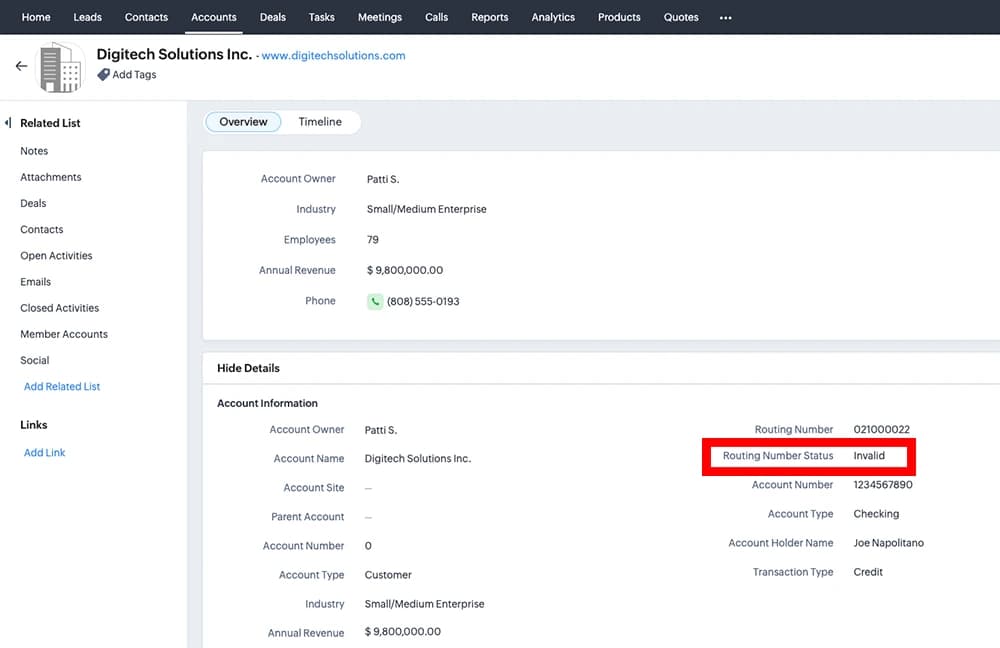
The result of the validation (“Valid” or “Invalid”) will appear after a few seconds in the drop-down field Routing Number Status. If the Routing Number field is empty, Routing Number Status will be empty as well.
Additional Resources
ToolSpector.com - Free online tool to validate ABA routing numbers (also in bulk).
Bugs, improvement suggestions and feature requests
Should the extension behave in a way you believe to be caused by a bug, please report it to us at [email protected] for further investigation. We also invite you to share with us at the same email address any improvement suggestion and feature request you might have.
Privacy
The extension performs all operations within your Zoho CRM instance and no data is shared with third parties, not even with us.
Read the Privacy Terms for more information.
Uninstall
You may uninstall the extension from the Zoho CRM admin panel, going to the Zoho Marketplace section.
Credits
The logo of the extension has been designed by Flaticon.